
1. Non-Human Identity (NHI) & AI Agent Governance 1.1 Azure AI Agents Connector for AI Foundry & Copilot Studio 1.2 Azure AI Foundry & Microsoft Copilot Studio Access Reviews 1.3 Self-Service Access Requests for AI Agents 1.4 Interactive Visual Mindmaps for Applications, Entitlements & Templates 2. User Access Reviews (UAR) & Campaign Management 2.1 “Revoke Immediately” Real-Time Access Deprovisioning 2.2 Manager Escalation & Reminder Notification Exclusions 2.3 Next Scheduled Launch Date on Campaign Scheduler Menu 2.4 Introduction of “Select All Entitlements” Option 3. Access Requests & Lifecycle Management (AR / ILM) 3.1 Entitlement List View & Multi-Line Display in Manage Access 3.2 Manual Entitlement Creation 3.3 Configurable “Requestable” Flag on Access Templates 3.4 Automated Approval Workflows for Birthright & Termination Policies 3.5 Visibility Policy Standard Attribute Support 3.6 Full Catalog Visibility for Administrator Logins 3.7 Active Directory OU Selection & Default Provisioning Password 3.8 Custom Application Branding for SFTP & Active Directory 4. Connectors & Enterprise Integrations 4.1 AWS Connector Modern Authentication via IAM Roles 4.2 Salesforce Connector Support for External Client Apps (ECAs) 4.3 Lightweight Slack Messaging Integration 5. System Administration, Audit & Compliance 5.1 Automated Notification for Terminated Employee Application Credentials 5.2 Dedicated Ticketing System Logs & Separated IGA Auditing 5.3 Auditor Role Access to Export Downloads 5.4 Clarified Inactive Definitions & Streamlined Ticketing Configuration 6. GRC Enhancements & Updates 7.1 In-Question Collaboration Chat 7.2 Improved Assessment Navigation & Reassignment 7.3 Asset Categorization & Contextual Reviews 7.4 Enhanced Assessment Review Screens 7.5 Vendor Risk Dashboard Enhancements 7.6 Customizable Risk Register 7.7 Smart Assessment Branching (Parent/Child Questions)
1. Non-Human Identity (NHI) & AI Agent Governance
1.1 Azure AI Agents Connector for AI Foundry & Copilot Studio
What’s New
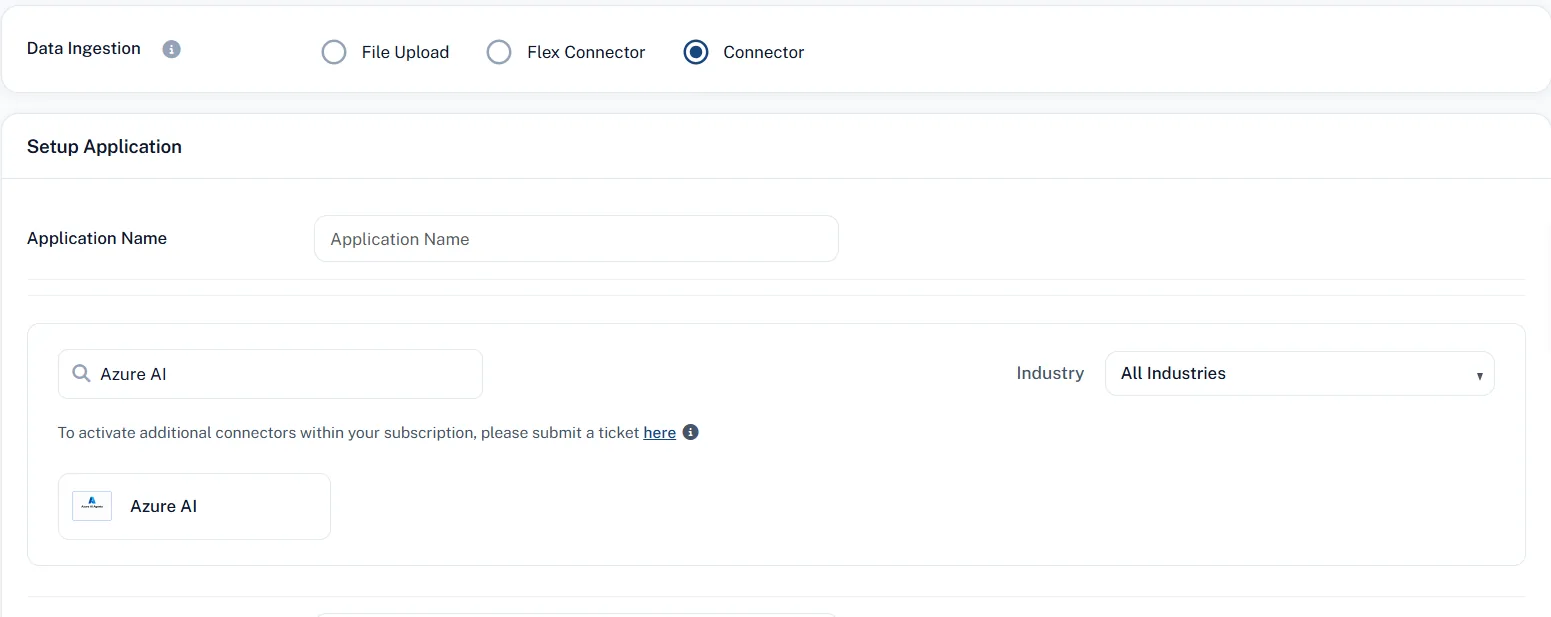
SecurEnds introduces a specialized Azure AI Agents connector enabling organizations to centralize the discovery, governance, and auditing of AI agents deployed across both Azure AI Foundry and Microsoft Copilot Studio. The connector normalizes agent configurations into a standardized governance model, ingesting critical resource hierarchies, agent descriptions, publishing statuses, assigned tool definitions, knowledge sources, and external connection metadata.
User Impact
Security and Identity teams can close the visibility gap surrounding autonomous AI agents and Non-Human Identities (NHIs). Administrators gain comprehensive visibility into all deployed enterprise agents from a centralized dashboard, ensuring corporate compliance and governance standards are maintained across modern AI deployments.
1.2 Azure AI Foundry & Microsoft Copilot Studio Access Reviews
What’s New
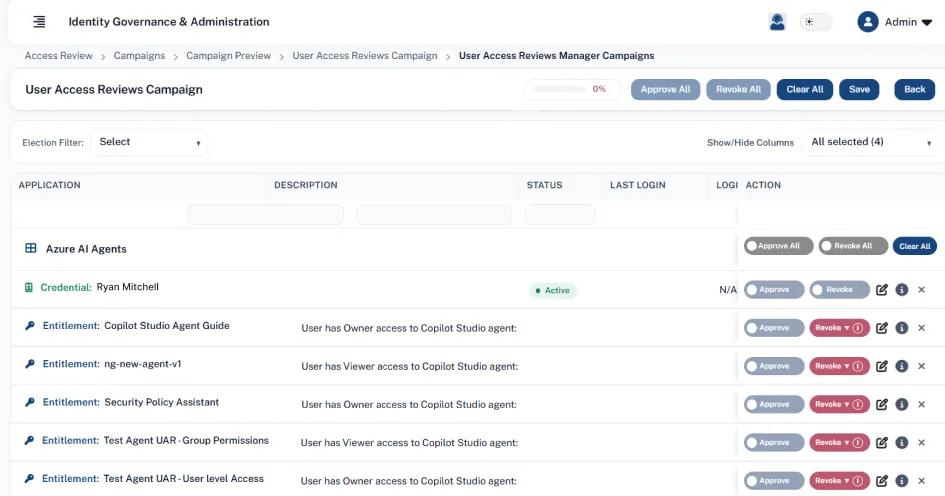
Access review campaigns now fully support AI agents discovered from Azure AI Foundry and Microsoft Copilot Studio. SecurEnds maps agent access permissions into structured entitlements (Agent Name / Role, such as HR Assistant / Consumer or Policy Bot / Editor) and identifies whether permissions are granted directly to a user or inherited via Microsoft Entra ID security groups. Reviewers can inspect assignment scopes (Agent-level, Project-level, or Environment-level) and agent capability context directly within the review interface.
User Impact
Reviewers are empowered with actionable context to evaluate AI agent access without needing administrative console access to Azure or Power Platform. This mitigates over-permissioned agent access, ensures clear least-privilege enforcement, and simplifies audit proof generation for enterprise AI tools.
1.3 Self-Service Access Requests for AI Agents
What’s New
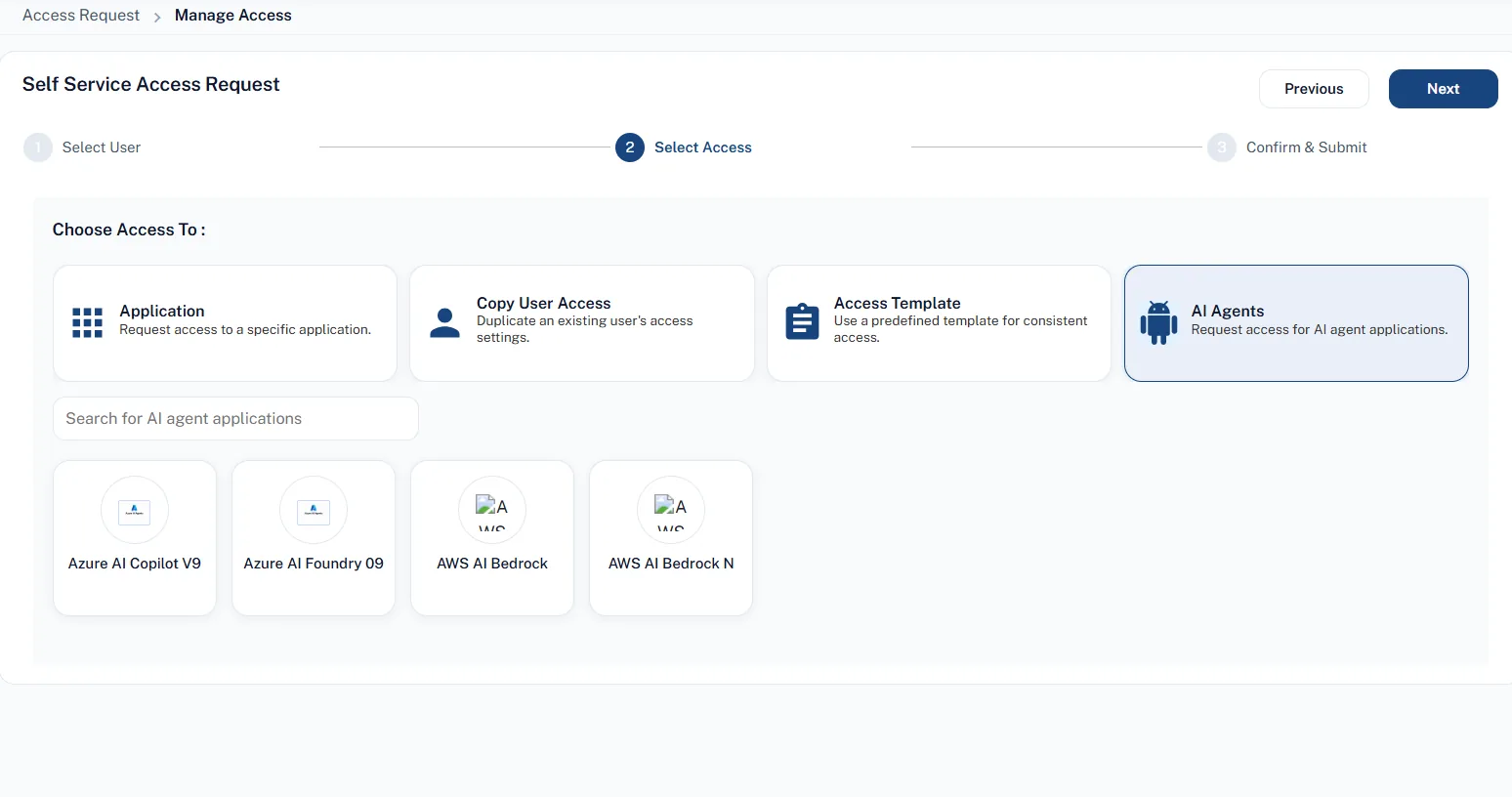
The Manage Access catalog has been expanded with a dedicated AI Agents category card. When the AI Agents module is enabled for a tenant, end users and managers can browse approved Azure AI and AWS AI agent applications, select required roles or access tiers, and submit self-service access requests following standard organizational approval and provisioning workflows.
User Impact
Employees can request necessary AI agent tooling through the familiar SecurEnds self-service portal, eliminating manual ticketing delays and shadow-IT provisioning while ensuring every access grant is tracked and authorized.
1.4 Interactive Visual Mindmaps for Applications, Entitlements & Templates
What’s New
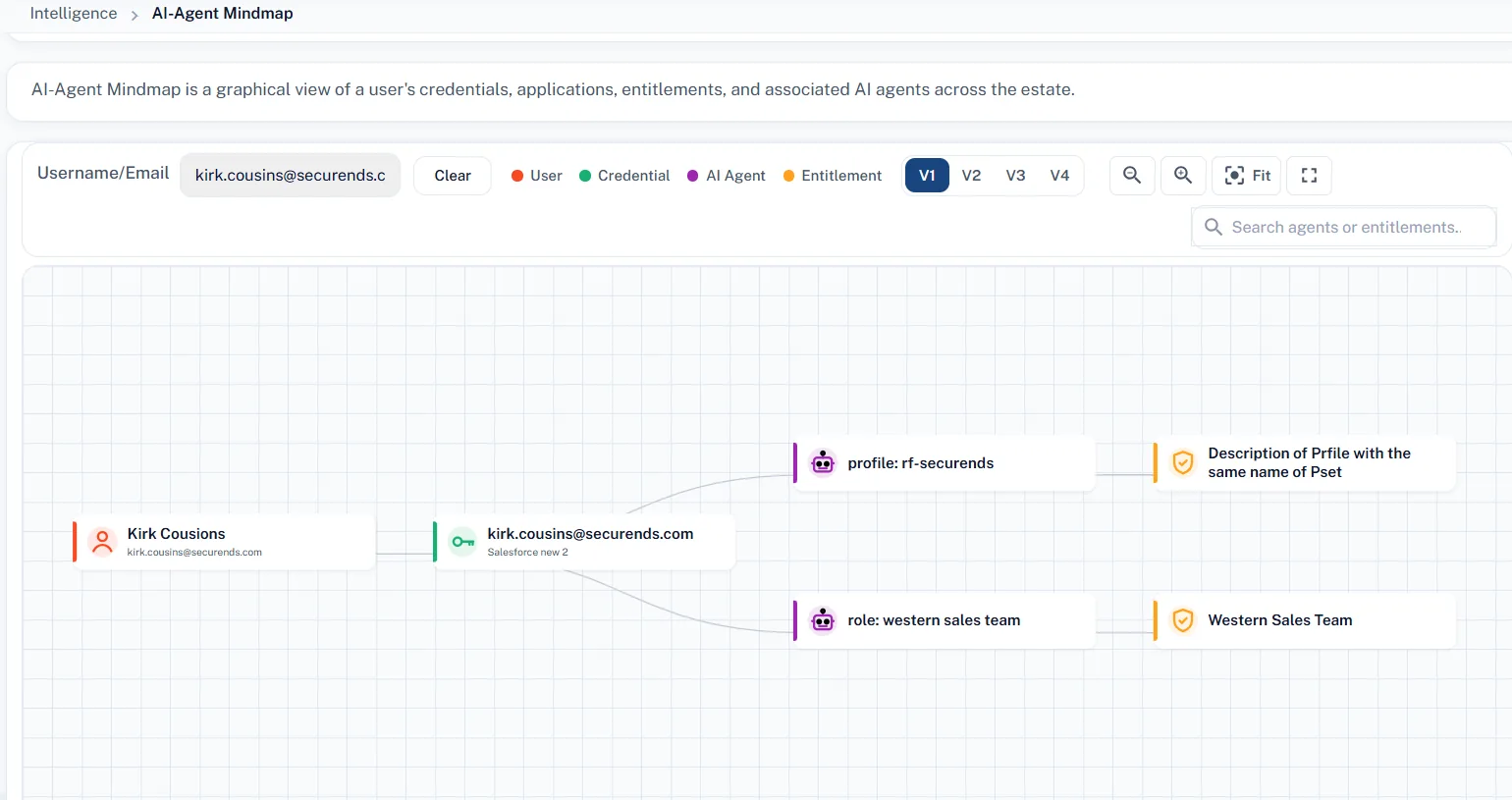
Visual Mindmap views have been upgraded across Applications, Entitlements, and Access Templates to align with the interactive graph visualization introduced for AI Agents. Users can interactively navigate relationships between identities, roles, parent-child groups, and assigned applications within an intuitive, graphical node layout.
User Impact
Administrators and compliance managers can quickly understand complex, multi-tiered entitlement structures and inheritance paths at a glance, significantly reducing the time required to diagnose permission sprawl or audit access architectures.
2. User Access Reviews (UAR) & Campaign Management
2.1 “Revoke Immediately” Real-Time Access Deprovisioning
What’s New
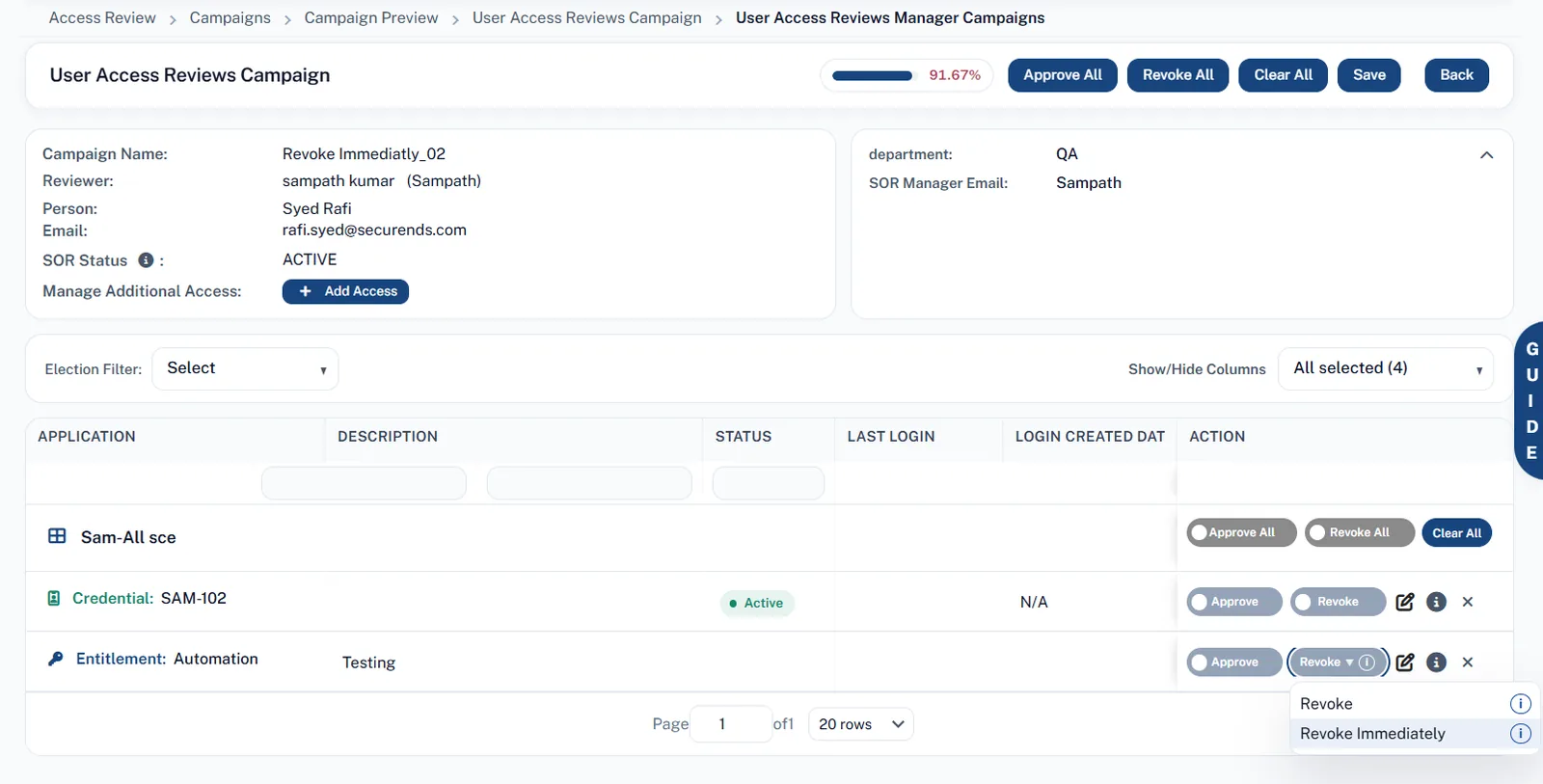
Campaign review screens now feature a dual-action revocation menu offering standard Revoke alongside a new Revoke Immediately capability at the entitlement level. When a reviewer confirms Revoke Immediately, SecurEnds instantly initiates an automated access removal request via the application’s configured fulfillment channel (direct connector, ticketing system, or email notification) without waiting for the campaign to conclude. Successfully processed immediate revokes are automatically locked as read-only and excluded from end-of-campaign batch deprovisioning routines to eliminate duplicate fulfillment tickets.
User Impact
Critical access risks, unauthorized privileges, and compromised accounts identified during reviews can be neutralized instantly. Reviewers no longer have to wait weeks for a certification cycle to close before high-risk access is revoked, dramatically shrinking exposure windows.
2.2 Manager Escalation & Reminder Notification Exclusions
What’s New
Campaign notification settings now allow administrators to exclude specific managers and executives from receiving automated escalation emails and review reminders when their direct reports have overdue review items. This builds upon existing campaign launch exclusion lists to provide granular communication controls for escalation flows.
User Impact
Prevents executive inbox fatigue and unnecessary alert noise for senior leaders while allowing campaign administrators to maintain firm escalation tracking across operational management tiers.
2.3 Next Scheduled Launch Date on Campaign Scheduler Menu
What’s New
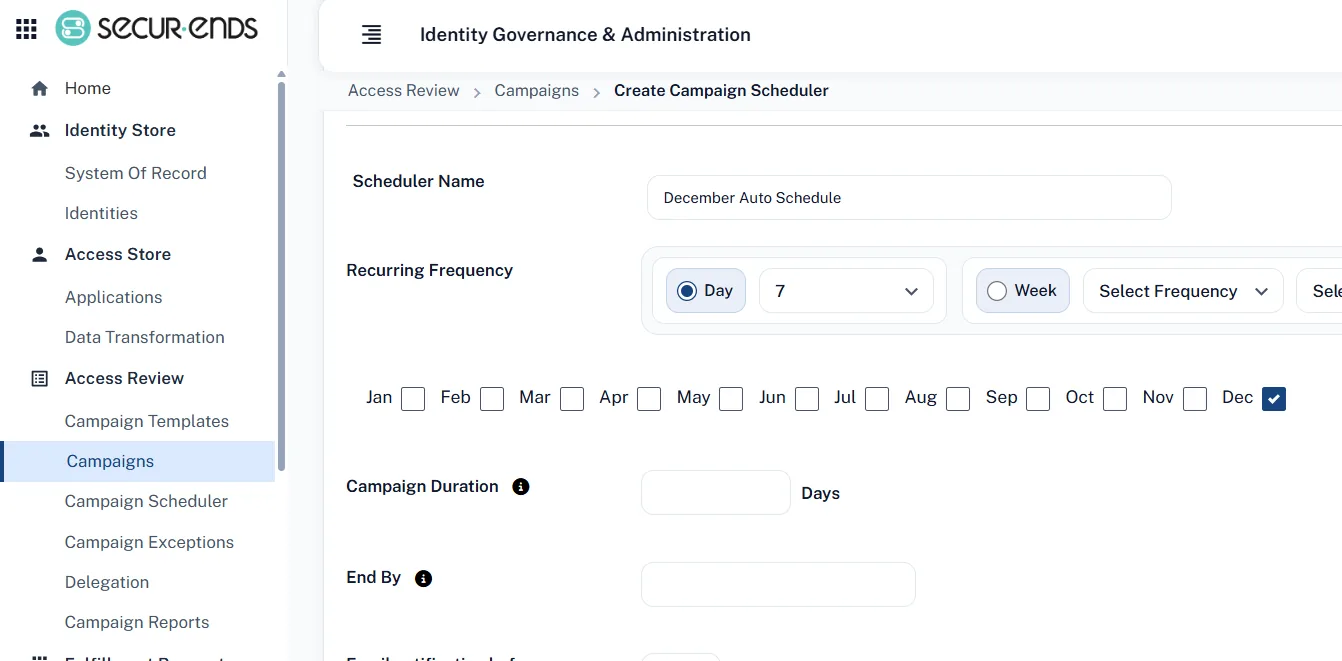
The Campaign Scheduler dashboard now displays the Next Scheduled Launch Date as a primary column directly on the main scheduler view. Administrators no longer need to open individual campaign configuration settings to inspect upcoming execution dates.
User Impact
Eliminates administrative overhead and eliminates loading delays previously experienced when opening settings on large campaigns with extensive Active Directory group mappings, providing an immediate snapshot of upcoming certification cycles.
2.4 Introduction of “Select All Entitlements” Option
What’s New
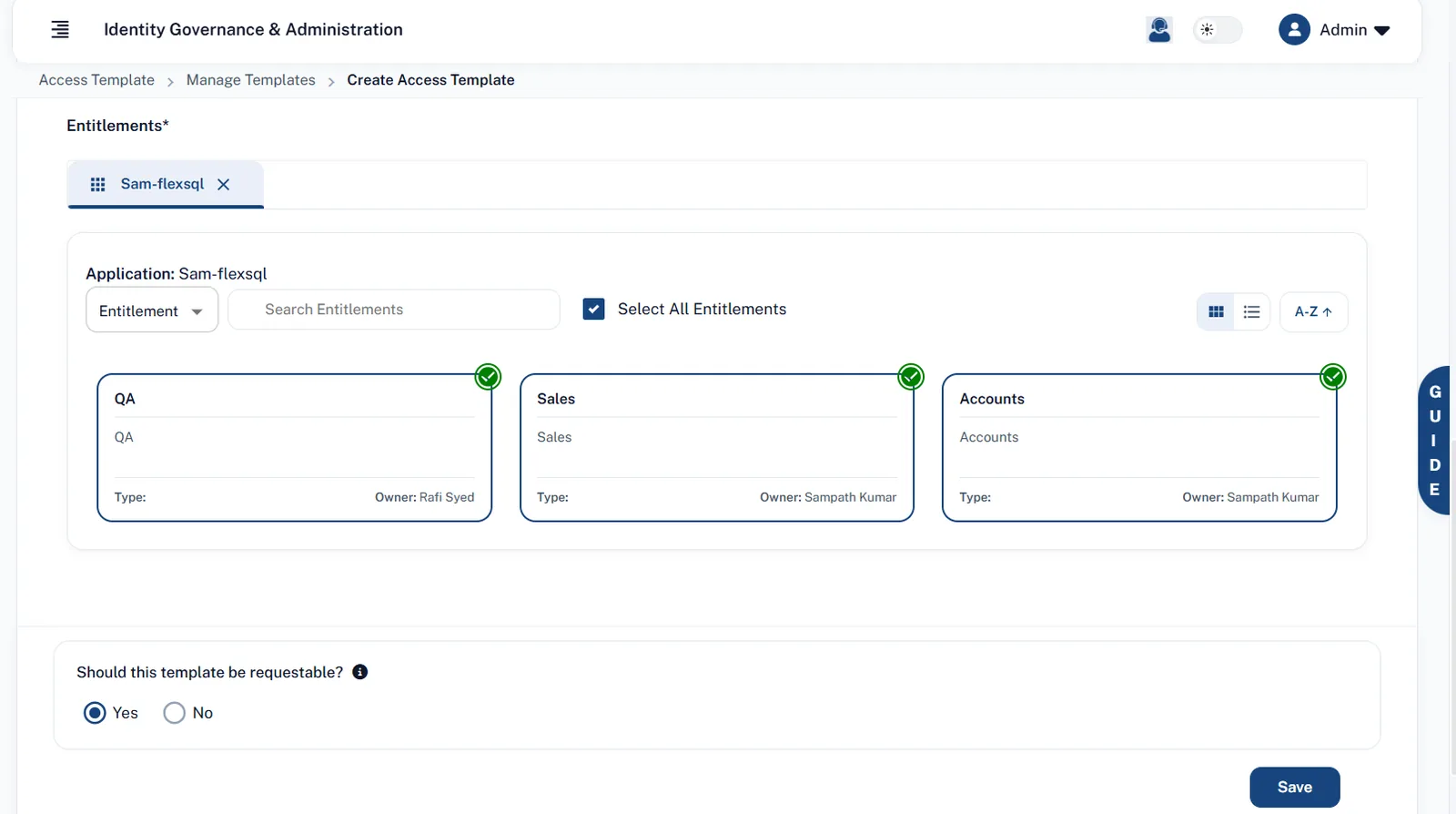
Added a single-click “Select All Entitlements” option with individual deselection support when configuring Access Templates, with selected items pinned to the top of the list.
3. Access Requests & Lifecycle Management (AR / ILM)
3.1 Entitlement List View & Multi-Line Display in Manage Access
What’s New
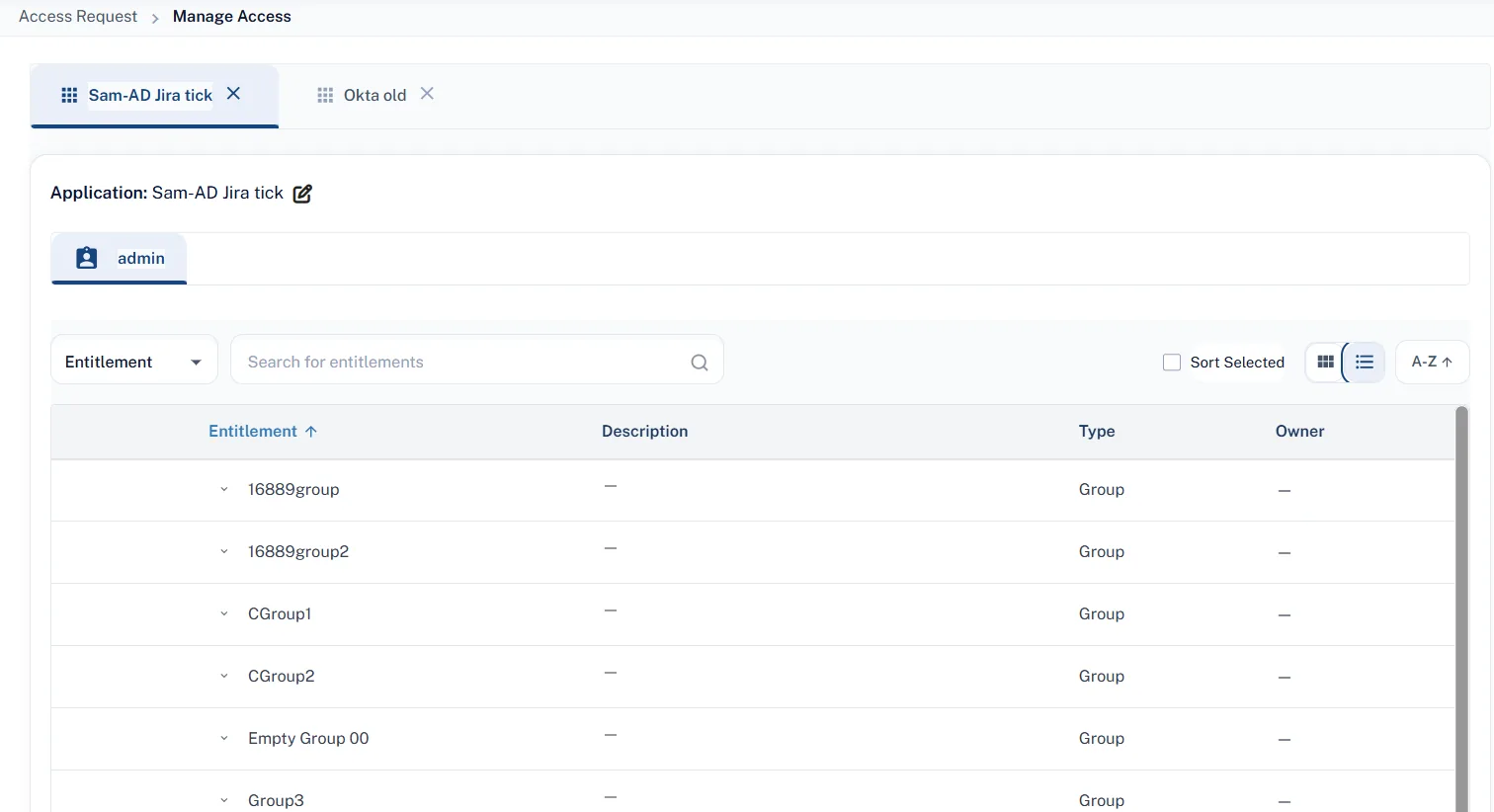
The entitlement selection interface in Manage Access and Access Templates has been updated to provide a toggle between the traditional Tile View and a structured List View. In List View, each entitlement is presented in a full-width row displaying its complete name with word-wrapping, description, entitlement type, and owner, alongside alphabetical (A–Z) sorting controls.
User Impact
Significantly enhances usability when selecting from applications with hundreds of similarly named or lengthy entitlements. Requesters can easily scan, sort, and select entitlements without truncation issues.
3.2 Manual Entitlement Creation
What’s New
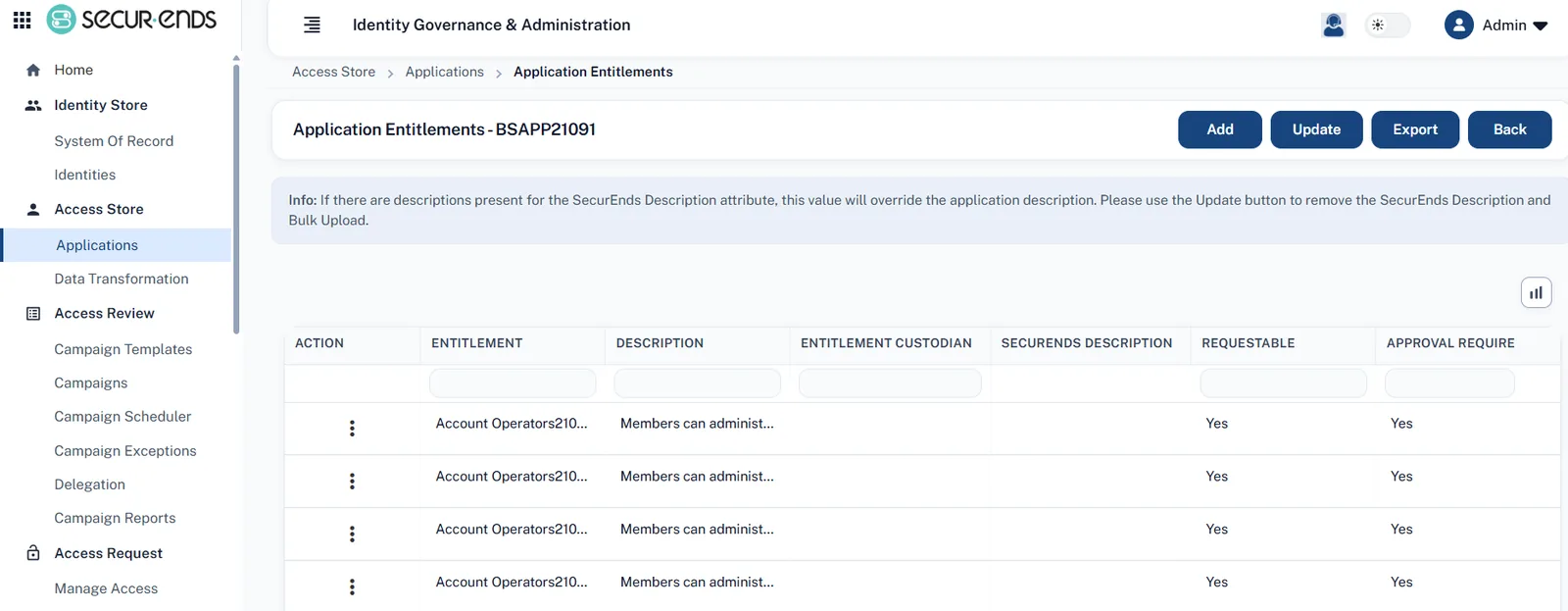
Application custodians and administrators can now manually add new entitlements directly from the Application → Entitlements interface. The feature includes strict duplicate validation (case-insensitive) and automatically detects if an entitlement exists in a purged state, giving admins the option to reactivate it immediately with full audit trail logging.
User Impact
Enables rapid onboarding of newly created roles or ad-hoc entitlements for immediate access requests without waiting for scheduled overnight imports or executing full application synchronizations.
3.3 Configurable “Requestable” Flag on Access Templates
What’s New
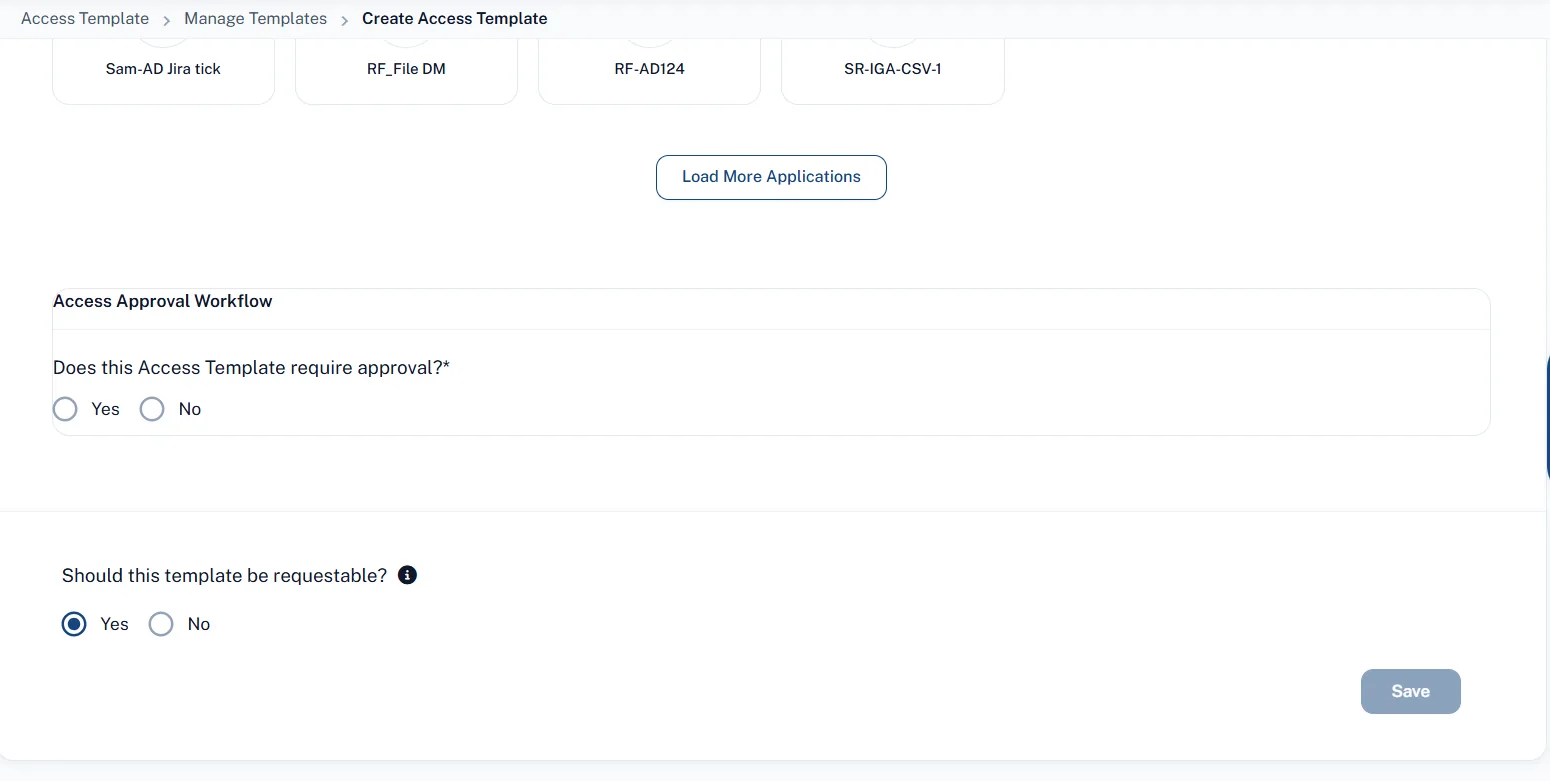
Access Template management now includes a configurable option: “Should this Access Template be requestable?” Setting this option to No conceals the template from the standard self-service Manage Access catalog while keeping it fully available for automated Birthright, Termination, and Scoping policies.
User Impact
Allows administrators to define pre-packaged access bundles for automated role-based lifecycle provisioning without cluttering the self-service catalog or exposing restricted baseline profiles to general requestors.
3.4 Automated Approval Workflows for Birthright & Termination Policies
What’s New
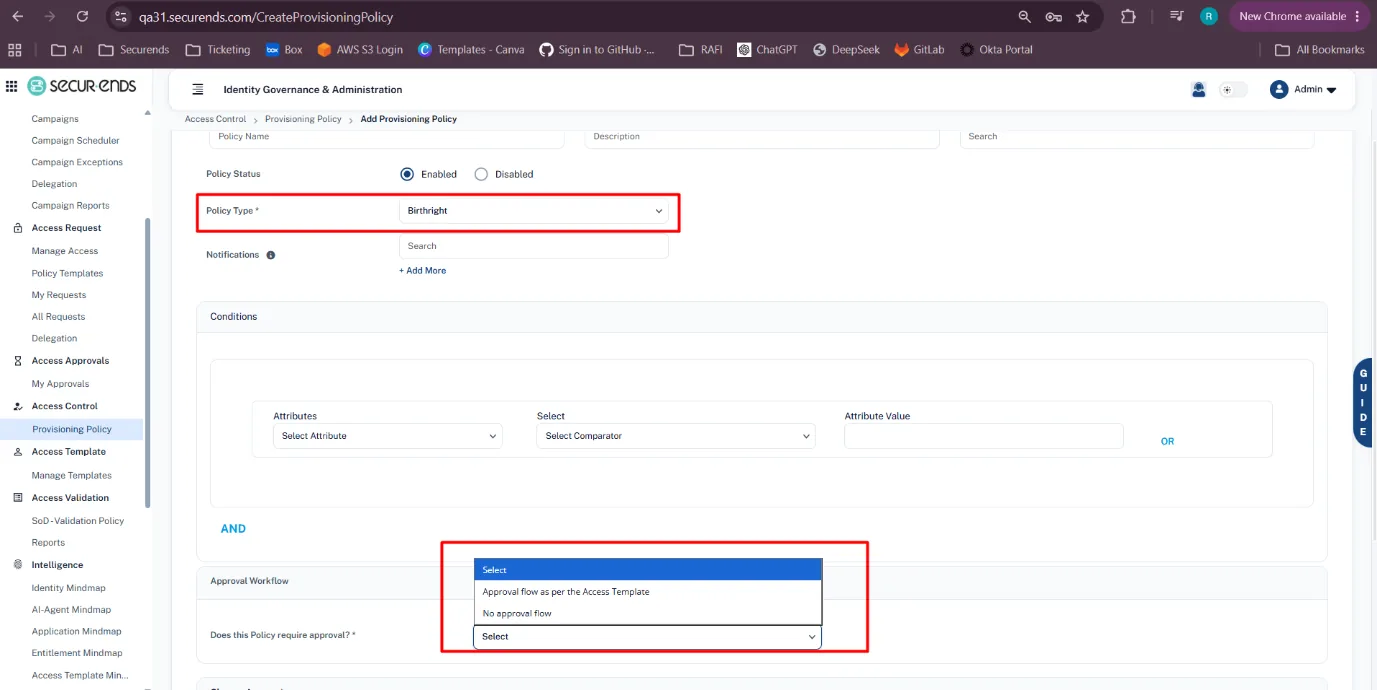
Provisioning policies for Birthright Access and Termination Rules now include a dedicated Approval Workflow configuration. Administrators can specify whether policy-triggered assignments require standard approval routing or should be set to No approval flow (Auto-Approved). Auto-approved requests are immediately processed for fulfillment and stamped with Auto Approved audit status in request tracking.
User Impact
Accelerates day-one onboarding and enforces rapid offboarding security by removing manual approval bottlenecks for pre-approved standard access bundles and mandatory termination deprovisioning.
3.5 Visibility Policy Standard Attribute Support
What’s New
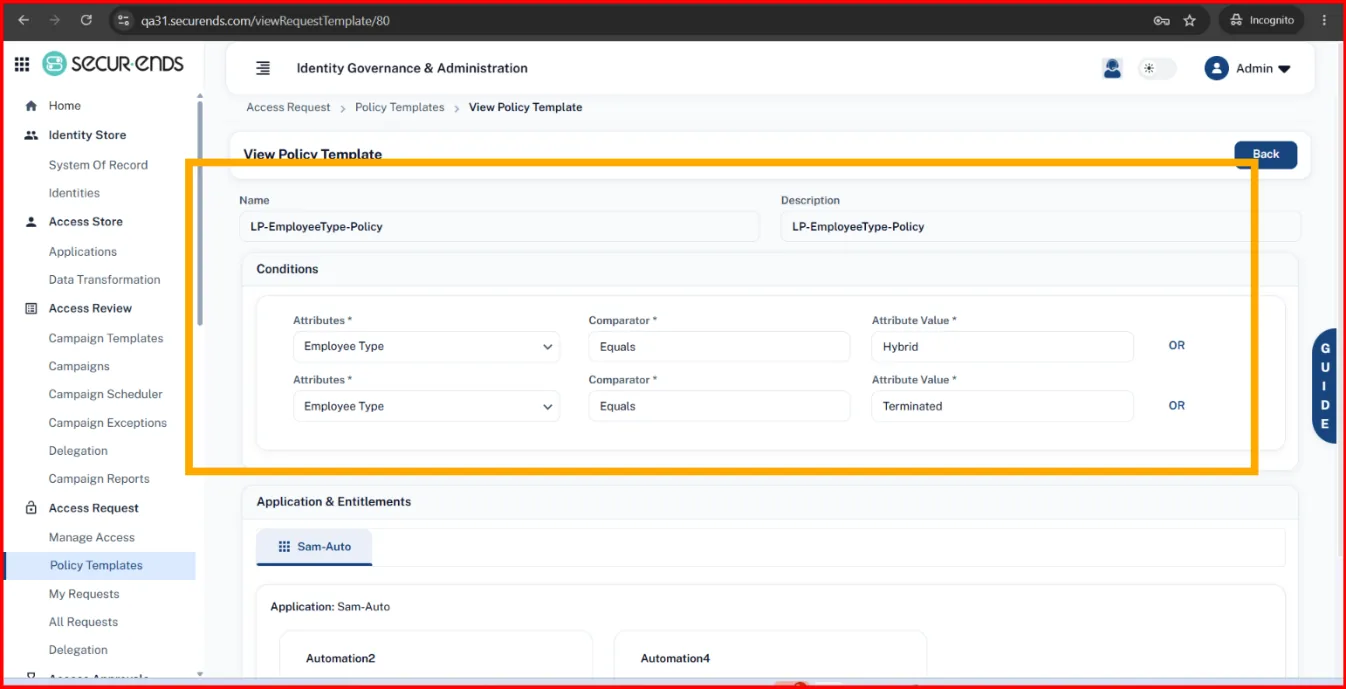
Policy condition engines now natively evaluate core user profile attributes stored in primary database columns (such as Employee ID, Employee Type, and Access Status) in addition to custom JSON attributes.
User Impact
Simplifies the administration of scoping and visibility rules, drastically reducing policy setup time while enabling precise role- and attribute-based catalog filtering.
3.6 Full Catalog Visibility for Administrator Logins
What’s New
When an administrator accesses the Manage Access module to submit requests on behalf of users, SecurEnds bypasses end-user scoping and visibility policy restrictions, displaying all configured applications and templates.
User Impact
Ensures system administrators have unrestricted oversight and the operational flexibility to provision any necessary application or entitlement across the organization without encountering artificial policy barriers.
3.7 Active Directory OU Selection & Default Provisioning Password
What’s New
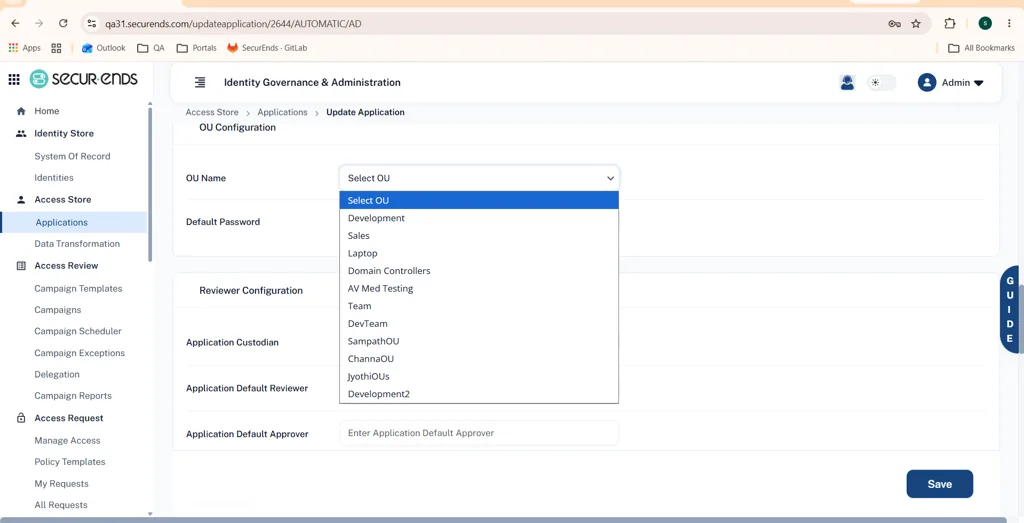
When configuring an Active Directory application with Access Requests enabled, a new OU Configuration section allows administrators to specify the default target Organizational Unit (OU) from a dropdown of available OUs and define an initial default account password for user provisioning.
User Impact
Streamlines automated AD account creation during access fulfillment, ensuring newly provisioned Active Directory accounts are created in the proper organizational structure with compliant temporary passwords.
3.8 Custom Application Branding for SFTP & Active Directory
What’s New
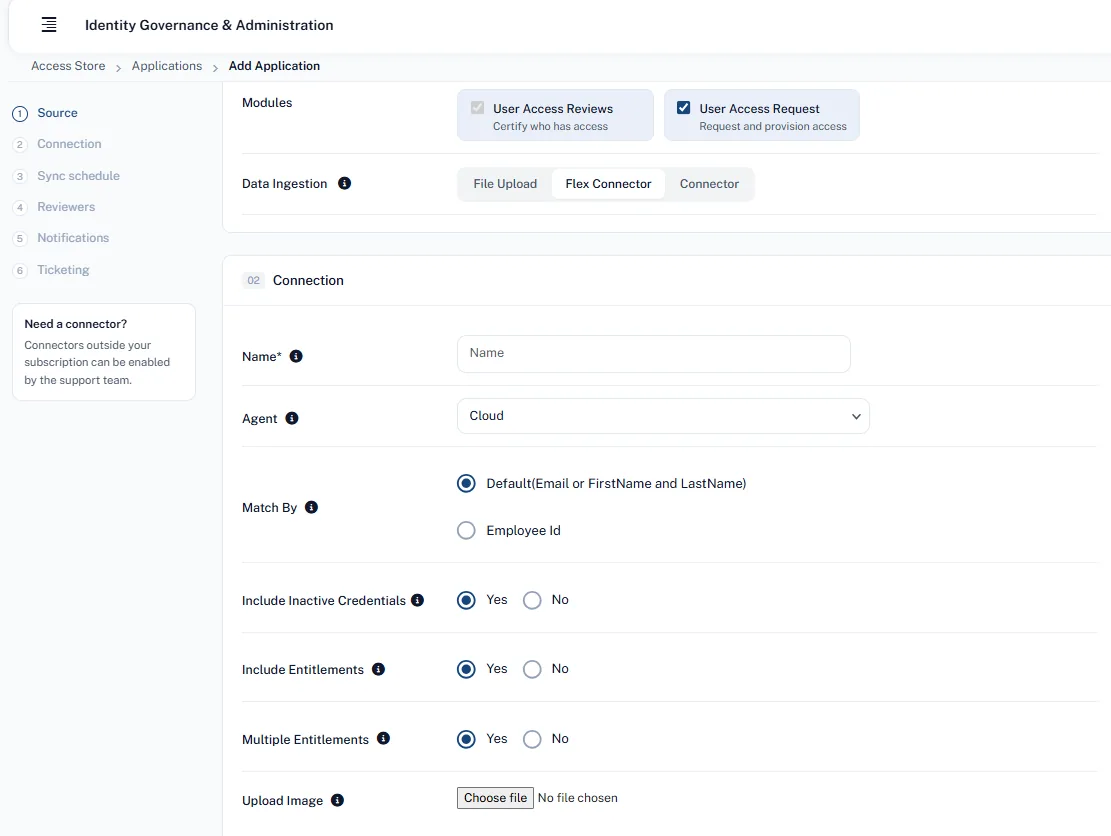
Administrators can now upload custom logos and icon images when configuring SFTP and Active Directory applications, bringing parity with CSV and SaaS application branding options.
User Impact
Enhances user experience and visual recognition across the Manage Access self-service catalog, helping employees quickly identify corporate systems during access requests.
4. Connectors & Enterprise Integrations
4.1 AWS Connector Modern Authentication via IAM Roles
What’s New
The AWS Connector has been upgraded to support authentication via AWS IAM Roles (AssumeRole) alongside traditional IAM user credentials.
4.2 Salesforce Connector Support for External Client Apps (ECAs)
What’s New
The Salesforce Connector has been updated to integrate via Salesforce External Client Apps (ECAs) using OAuth 2.0 flows, aligning with Salesforce’s modern integration framework and phasing out legacy username-password authentication.
4.3 Lightweight Slack Messaging Integration
What’s New
The Slack integration has been streamlined to focus exclusively on 1-on-1 direct user notifications. Legacy code dependencies for public channel broadcasting have been removed, drastically reducing the OAuth permissions and bot token scopes requested from workspace administrators.
5. System Administration, Audit & Compliance
5.1 Automated Notification for Terminated Employee Application Credentials
What’s New
A new automated security notification (IS_EMAIL_TERMINATED_APP_CREDENTIAL_NOTIFICATION) has been introduced. When an SOR sync flags an identity as Terminated, SecurEnds automatically compiles and emails a CSV report (Active_Accounts_with_HR_Status_Terminated.csv) to administrators detailing all associated application accounts that still show Active status across target systems.
5.2 Dedicated Ticketing System Logs & Separated IGA Auditing
What’s New
Under Admin Console → Logs, a dedicated Ticketing System category has been established, cleanly separating logs into Campaigns and Access Requests (IGA). Access Request logs capture Request ID, Application Name, Action, Status, Log Message, and Timestamp for every ticket interaction.
5.3 Auditor Role Access to Export Downloads
What’s New
Users assigned the Auditor role have been granted direct access to the Admin Console → Export Downloads menu to view and download asynchronous reporting exports they initiate.
5.4 Clarified Inactive Definitions & Streamlined Ticketing Configuration
What’s New
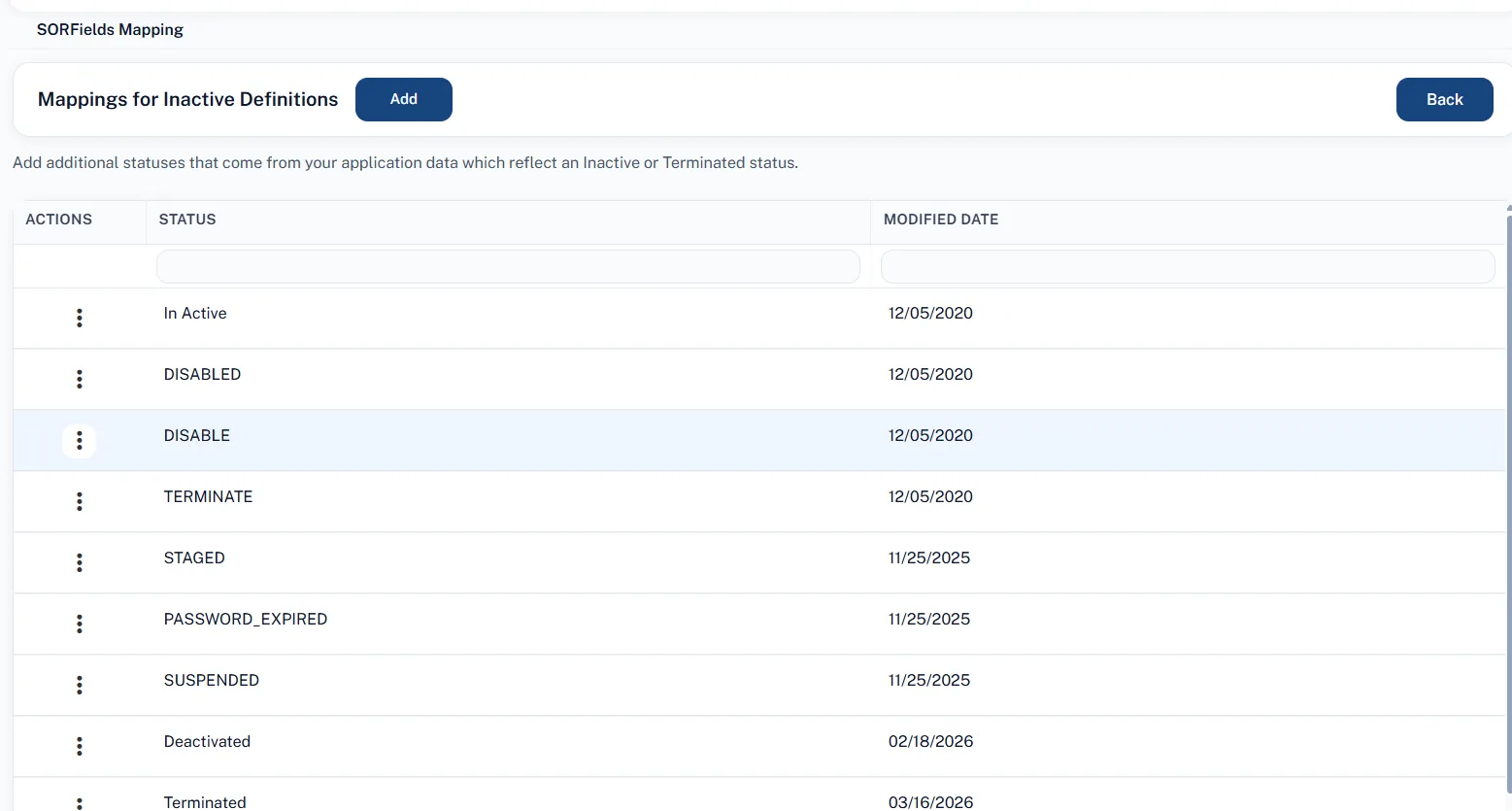
Inactive Mapping Terminology: The “SOR Fields Mapping” interface has been redesigned as Mappings for Inactive Definitions, with updated instructional tooltips clarifying how application status values map to Inactive/Terminated definitions.
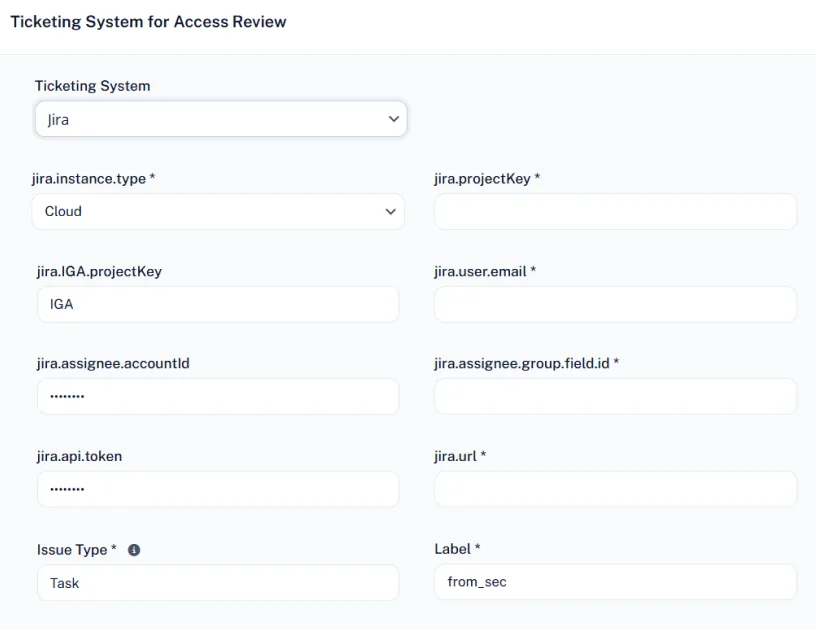
Inline Jira & Ticketing Settings: The Jira ticket label setting (JIRA_TICKET_LABEL) has been moved directly inside the Jira Ticketing Setup wizard, and the Manage Assign Details button has been promoted to a primary action on the Ticketing dashboard.
6. GRC Enhancements & Updates
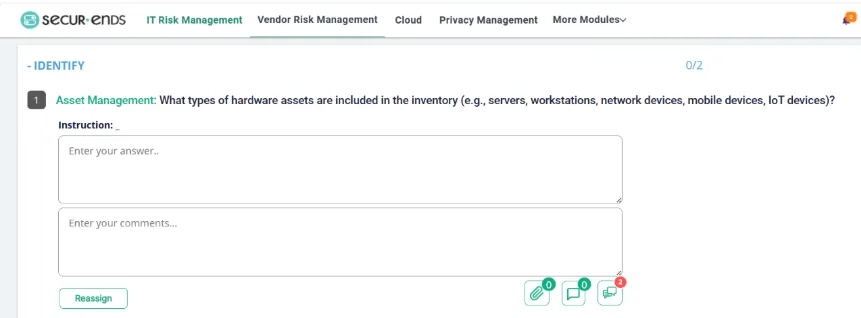
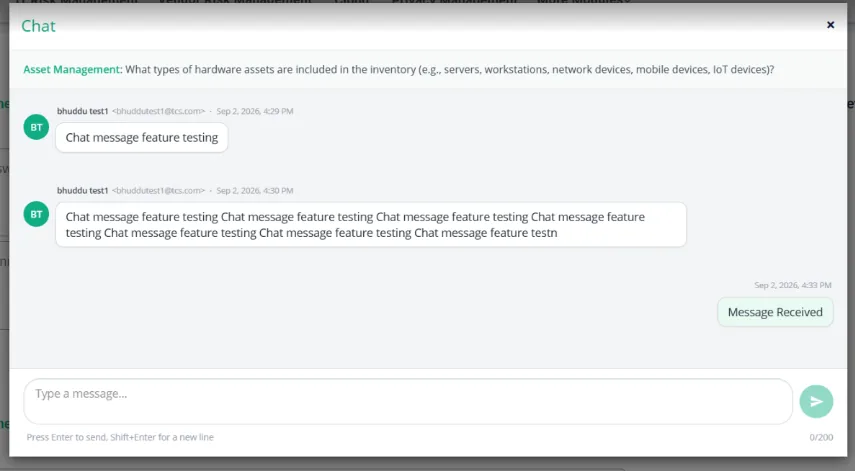
7.1 In-Question Collaboration Chat
What’s New
A new chat feature has been added directly within assessment questions to streamline communication.
User Impact
Admins, Reviewers, and Assessment Owners can now collaborate in real-time by clicking the message icon on any question. To ensure you never miss an update, the system sends automated email notifications with direct links whenever a new message is posted. The full conversation history, including timestamps and sender details, is visible to all participants.
7.2 Improved Assessment Navigation & Reassignment
What’s New
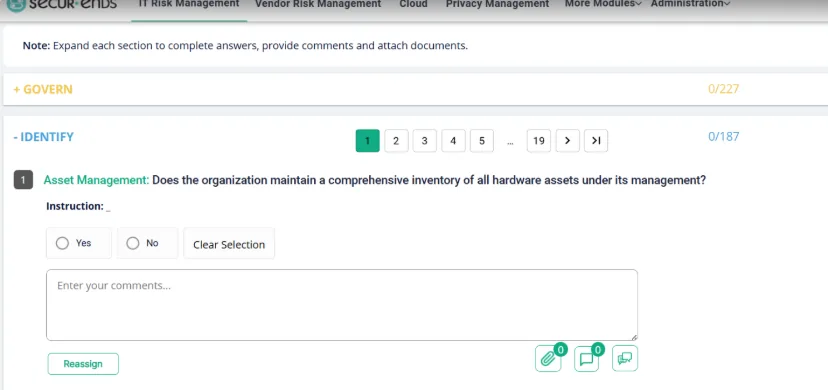
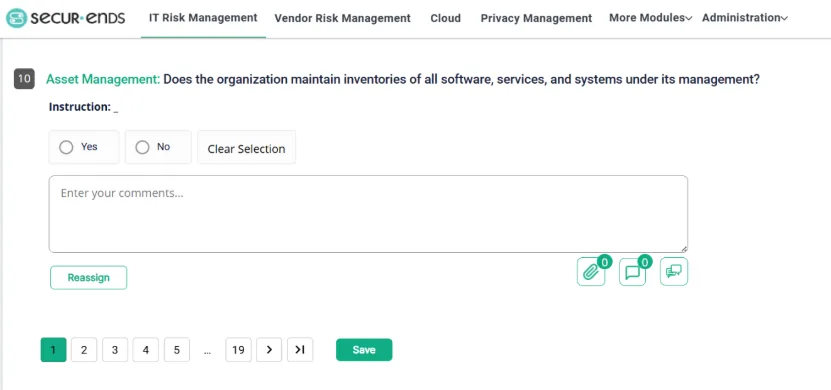
Enhancements to the GRC module for better usability and faster workflows.
User Impact
Easier Navigation: Page numbers are now available at both the top and bottom of NIST categories, so you can move between questions without scrolling.
Quick Reassignment: You can now reassign “Open” or “Ready” assessments directly from the menu icon in the Assessment section, removing the need to launch the assessment first.
UI Updates: The “Save” button and pagination controls have been moved for better visibility, and text sizes for NIST Core Functions have been increased for improved readability.
7.3 Asset Categorization & Contextual Reviews
What’s New
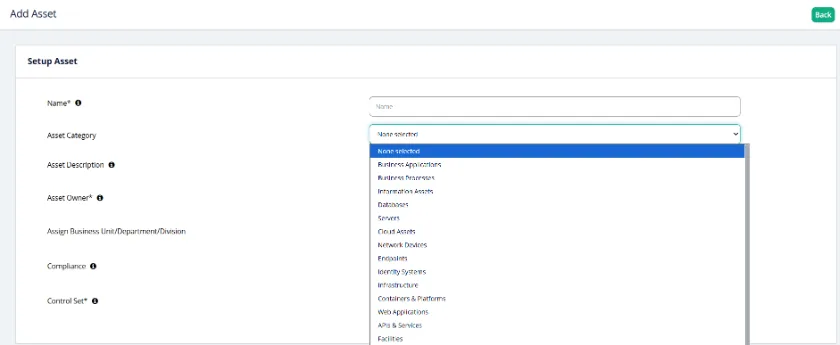
New fields for Asset Category and Description to improve inventory management.
User Impact
Better Organization: Admins can now categorize assets (e.g., Cloud Assets, Databases, Servers) and add descriptions during setup.
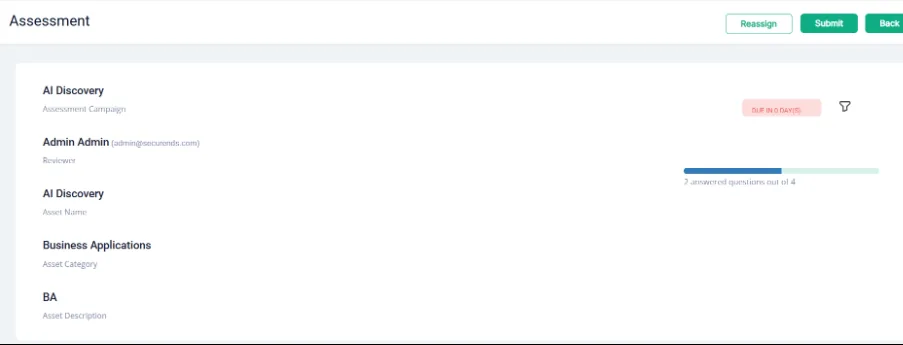
Enhanced Review Context: Reviewers will now see the category and description alongside the asset name during assessments, providing the necessary context to make informed decisions.
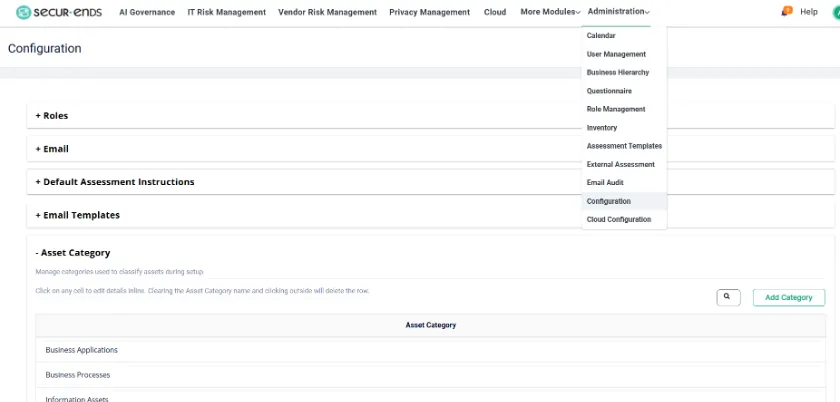
Custom Categories: Admins can now manage and add new asset categories through the Administration configuration page.
7.4 Enhanced Assessment Review Screens
What’s New
The assessment review screen under IT Risk Management has been updated to display comprehensive details, including assessment, asset, and reviewer information in a structured format.
7.5 Vendor Risk Dashboard Enhancements
What’s New
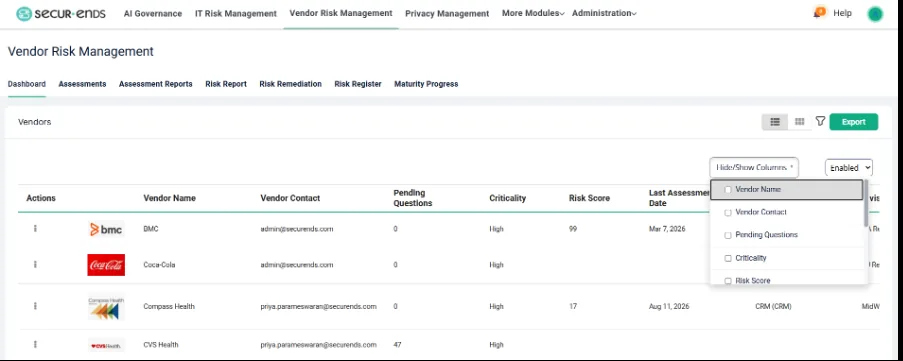
The Vendor Risk Management dashboard now includes additional data columns — Risk Score and Last Assessment Date — giving you more visibility into vendor status directly from the main view. An advanced search filters has been added, allowing you to search for vendors by Name, Contact, Department, Division, or Control Set.
User Impact
You can evaluate vendor risk at a glance without opening individual profiles. The new filters and customizable column layout let you tailor your workspace to show only the information relevant to your current task, reducing clutter and speeding up your workflow.
7.6 Customizable Risk Register
What’s New
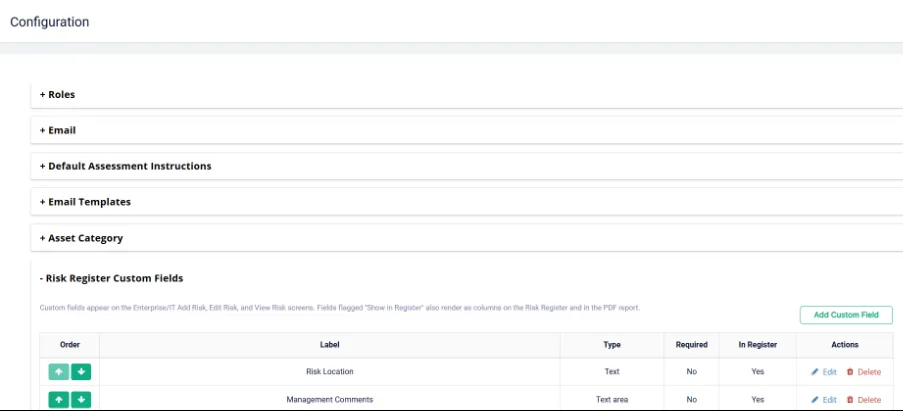
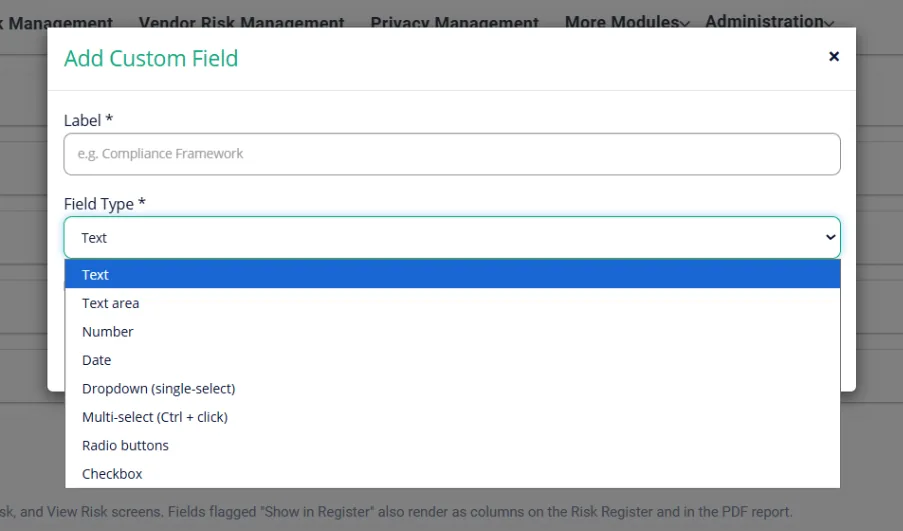
The Risk Register module now includes a drag-and-drop form builder. Administrators can use it to design custom “Add Risk” intake forms with field types such as dropdowns, date pickers, checkboxes, and file uploads.
In Configuration, Go to Risk Register Custom Fields
User Impact
Teams can now capture risk data tailored to their organization’s specific needs. Custom fields entered during intake sync automatically to the Risk Register table, keeping reporting and risk tracking consistent and complete.
7.7 Smart Assessment Branching (Parent/Child Questions)
What’s New
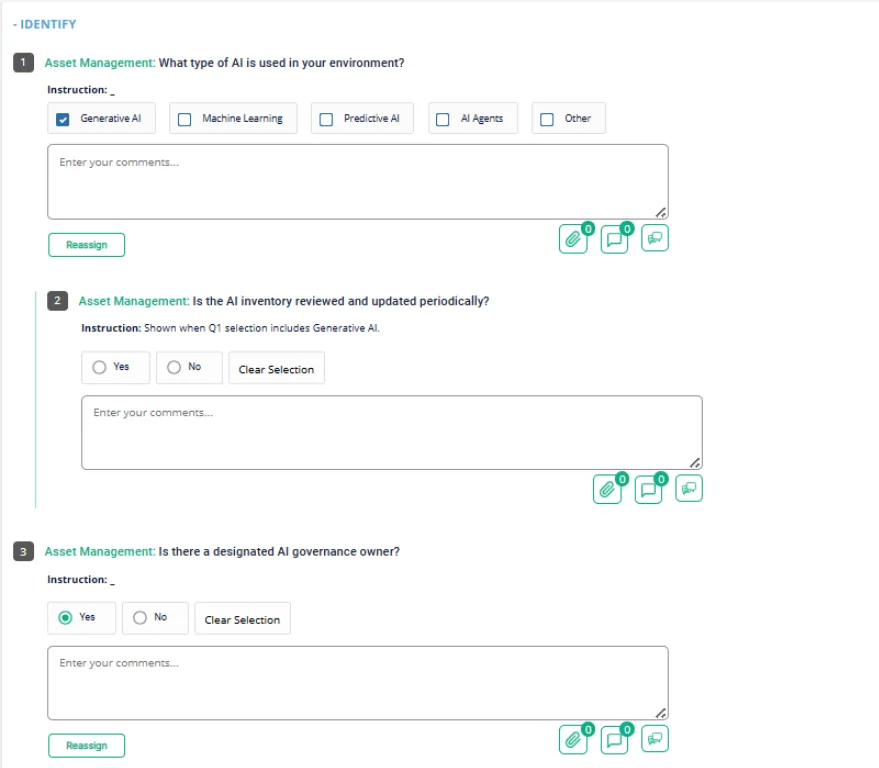
We’ve introduced conditional logic to GRC assessments, allowing for “Parent/Child” question relationships. Administrators can now configure specific answers to trigger follow-up questions automatically. This includes support for nested branching and real-time updates that show or hide relevant sections as you fill out the form.
User Impact
This update significantly streamlines the respondent experience by ensuring you only see and answer questions relevant to your specific context. It eliminates the clutter of non-applicable questions, improves accuracy by excluding hidden fields from mandatory validation, and ensures that final reports only contain data from the questions you were actually required to answer.
